Data Management
Transferring Scans to OSIRIX
Scan data is stored on the scanner computer immediately after acquisition. All DICOMs (most if not all non-MRS data) can be easily transferred to the OSIRIX database stored in the Highlands Scanner Office and transferred to an external disk from the Mac.
To transfer scans to OSIRIX, perform the following steps:
-
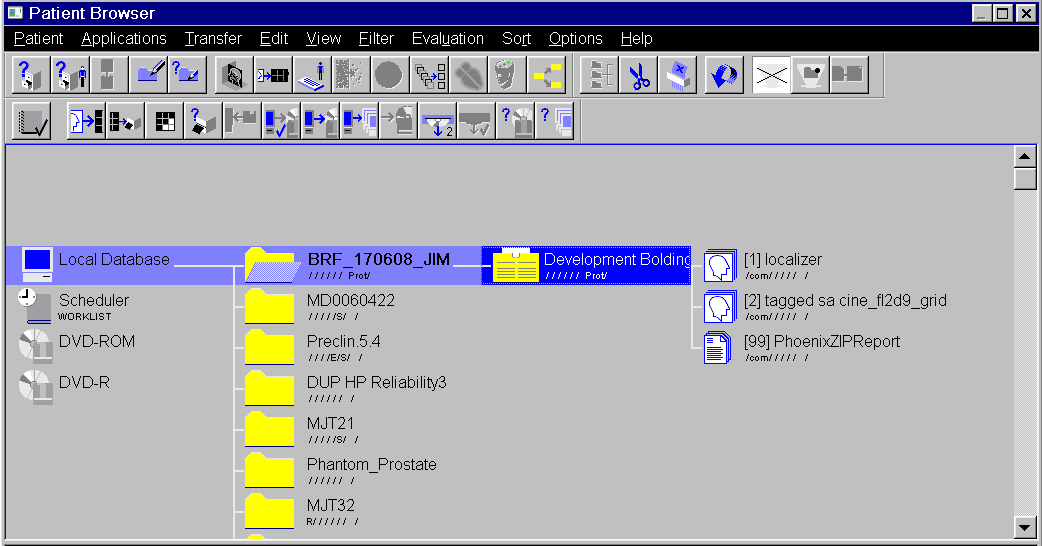
Open the patient file browser
-
Select the participant you would like to transfer
- Select Transfer >> Send To >> OSIRIX
Once this is selected, the transfer will begin.
Non-DICOM Data
Scan Data
Non-dicom scan data must be transferred directly from the scanner computer to an external hard drive. These external hard drives must either come directly from CINL or be approved by CINL before use. Do not use anapproved hard disks to retrieve data directly from the scanner computer. This can cause issues with the scanner impacting future scans.
Important
CINL drives may never leave Zone III of Highlands MRI or be used with any computers outside of the Osirix computer and the console computer. CINL approved drives are either those that CINL provides, or hardware encrypted (not software encrypted), or have a write protect switch. If you decide to purchase a drive that meets CINL’s qualifications, please let CINL staff know and we will label your drive accordingly. Note that CINL approved drives must only be used for transferring CINL data.
Physiological Data
Physiological data not stored as DICOMS must be retrieved from the scanner computer. These data are not stored in the File Browser with the scans. If you do not know how to access the physiological data, please request assistance from Eleanor or Elizabeth.
Stimulus and Task Data
when presenting and recording data using the stimulus Mac or Windows machine, those can can be directly retrieved from those machines using an external disk or transferred to cloud storage when using the Mac. After transfer, please remove the created data files to prevent storage from becoming full.
Transferring Scans to XNAT
XNAT is an online storage location for DICOM MRI data. You can transfer data directly to XNAT from the scanner computer and is freely available for anyone at UAB. Please read more about XNAT and how to use it in the XNAT documentation.
Scan Data Storage Protocol
Scan data is directly stored on the scanner computer after acquisition, but this computer is not meant for long-term data storage. Scans will be removed every week or when the local scanner drive is full. After being removed from this computer, if you did not transfer the data or the transfer was unsuccessful, the data is unrecoverable. It is good practice to transfer data to at least two of XNAT, OSIRIX, or a local drive. Do not leave data transfer up to chance!